BP Care - Pressure & Sugar
- 3.4
- Rating
- 1.00M
- Installs
- Free
- Price
 Analysis by App-foxy
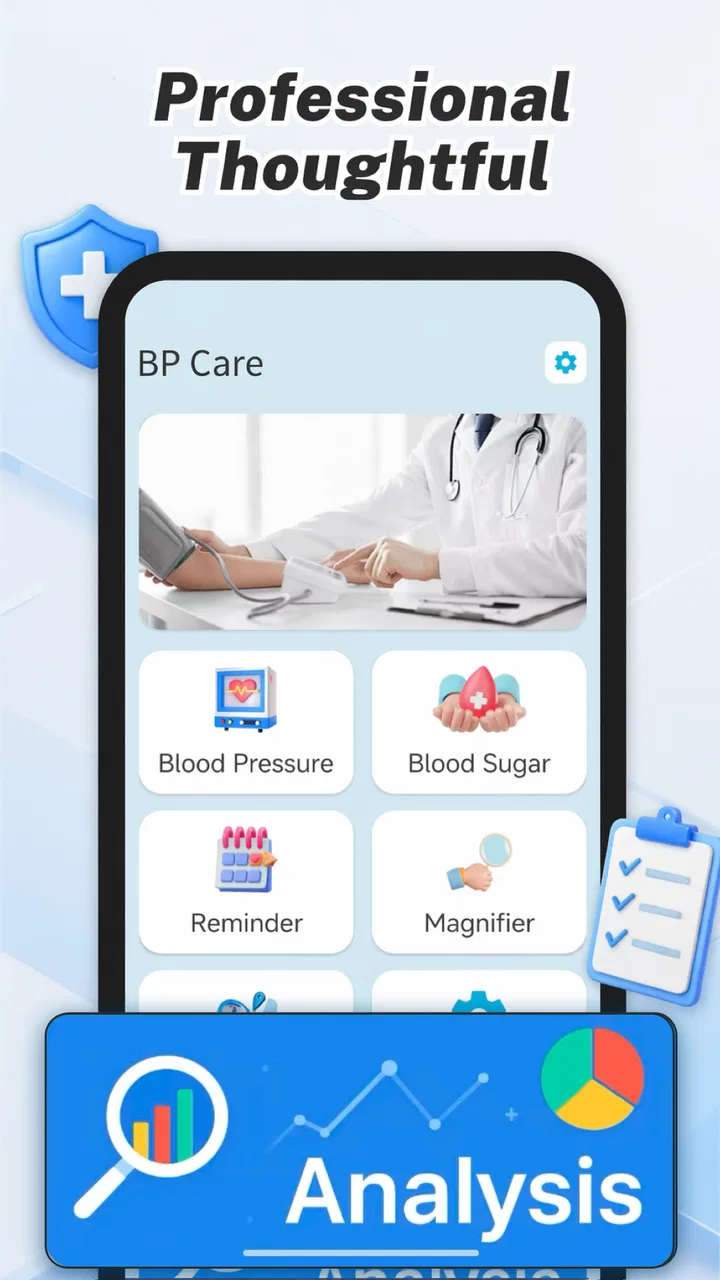
I approached BP Care - Pressure & Sugar as a simple health-recording tool rather than a medical treatment app. That distinction matters from the first use: its role is to help me keep blood pressure and blood sugar information together in one place, not to replace a monitor, a clinician, or professional medical advice. For someone who regularly forgets readings or struggles to explain patterns during an appointment, that basic purpose can be genuinely useful.
The app comes from Brainy Lab Studio and sits in the Tools category. It is free to use, carries an Everyone age rating, and is intended for Android devices running version 9 or later. The current release is version 1.5. Its short store label, “BP Care,” is brief, but the longer description makes the central idea clear: recording blood pressure and blood sugar conveniently.
What I like about this kind of app is that it addresses an ordinary problem rather than promising a dramatic solution. Home measurements are only helpful when I can remember them, organize them, and show them clearly later. BP Care - Pressure & Sugar is aimed at that gap. Its usefulness depends less on excitement and more on whether its recording workflow fits naturally into a daily routine.
You May Also Like

 Blood Strike: 2.5 Anniversary
Blood Strike’s Loadouts Turn Every Drop Into a Tactical Gamble
A close look at Blood Strike’s custom loadouts: how fast access to signature weapons reshapes its battle royale rhythm, rewards preparation, and narrows the gap between fights.

 Pandora - Music & Podcasts
Pandora’s Music Is Easy to Start, but Harder to Recover
Pandora’s strength is its low-effort path from a seed to a station. Its weak spot is how much confidence it asks you to place in connection, setup, and quiet recovery.

 8 Ball Pool
 Is Built on Rivalries, Rematches, and Routine
A close look at the rivalries, rematches, shared routines, and unanswered safety questions that turn a quick pool match into a persistent mobile community.

 Samsung Music
’s Quiet Strength Is Playing What You Already Own
Its reach comes less from spectacle than from dependable access to a personal library. That simplicity is both the app’s strongest retention engine and its ceiling.

 AccuWeather: Weather Radar
AccuWeather Review: A Quick, Clear Forecast for Everyday Decisions
For everyday plans, the best forecast is the one you can understand quickly. AccuWeather makes rain timing, radar, and local conditions easy to act on, with a few trade-offs.

 Hill Climb Racing
Why Hill Climb Racing Still Turns Crashes Into One More Run
A tiny car, a bumpy hill and one more upgrade: Hill Climb Racing keeps resurfacing because its simple chaos makes every near-miss feel personal.
More From Our News Desk



How the free access affects its practical value
The most important cost detail is straightforward: the app is free. That makes it easy to try without committing money, which is especially helpful for people who are unsure whether a digital log will improve their routine. I can test it alongside my existing blood pressure monitor or glucose meter and decide whether the habit is worth keeping.
Free access also changes how I judge the app. I do not expect it to compete with a full clinical platform on the basis of a simple tracking role. Instead, I look for a clean way to enter readings, review them later, and avoid confusion between blood pressure and blood sugar records. If it makes those tasks less tedious, it offers useful value without adding a purchase decision.
Its reach suggests that this straightforward approach appeals to many people. BP Care - Pressure & Sugar has passed one million installs, while its average rating is 3.7 from around 1.7 thousand ratings. I read those figures as a sign of practical interest rather than universal approval: enough people find the concept worthwhile, but the rating also suggests that expectations and day-to-day experience may vary.
The free price is particularly relevant for family use. A relative may want to maintain a record for an older family member, while the person taking the readings may not want to pay for another subscription. I would still be careful about sharing a device or account, because health records are personal and the app should be treated as a private log rather than a communal notebook.
There is one important boundary to keep in mind. Free does not mean the app can measure either health value by itself. I would still need a suitable blood pressure cuff and a blood glucose meter, used according to their instructions. The application is where I record results; it is not a replacement for those instruments. That separation prevents a common mistake: assuming a convenient record automatically makes a reading accurate.
The daily workflow I found most sensible
The best way to use the app is to make recording part of the measurement routine instead of postponing it. After taking a reading, I would enter it immediately while the numbers are still visible. Delaying the entry until evening creates avoidable uncertainty, especially when several readings were taken during the day.
For blood pressure, I would keep the upper and lower values together and avoid treating one number as the complete result. For blood sugar, I would also note the context in my own routine, such as whether the reading was taken before or after eating, if the app provides a suitable place to do so. If the interface does not offer the exact context I need, I would use a consistent personal notation only if the app supports notes; otherwise, I would not pretend that an unlabeled number tells the whole story.
A useful habit is to enter readings at approximately consistent times when a healthcare professional has asked for a schedule. Consistency makes a record easier to interpret than a collection of random checks. However, I would not alter a doctor’s instructions just to make the app look tidy. The health plan comes first, and the app should follow that plan.
One non-obvious advantage of keeping both categories in the same tool is reduced switching. Someone monitoring two related areas can avoid scattering blood pressure entries in one notebook and glucose entries in another app. That can make appointment preparation faster: I can review one record instead of reconstructing a timeline from paper slips, phone notes, and memory.
There is also a practical error-control benefit. Entering a result immediately gives me a chance to compare the number on the device with what I typed before moving on. If I wait, I may reverse digits or assign a blood sugar reading to the wrong day. The app cannot prevent every mistake, but a disciplined entry routine can reduce them.
What the app can and cannot tell me
I would use BP Care - Pressure & Sugar to preserve information, not to diagnose myself. A list of readings may reveal that I have questions to ask at an appointment, but it does not explain why a value changed or what action is safe. A single unusual result can be affected by technique, timing, stress, recent activity, or equipment, so I would not make a medical decision from the app alone.
This is where the app’s simple positioning is both a strength and a limitation. It keeps the purpose understandable: record blood pressure and blood sugar. For a person who only needs a digital log, that focus may be welcome. For someone expecting medication guidance, automatic interpretation, or clinical communication, a dedicated healthcare service may be a better match.
I would also avoid using the app as an emergency alarm unless that capability is clearly available and tested. A health log is not the same as a monitoring service. If a reading is concerning or symptoms are serious, I would follow professional advice or seek urgent care rather than waiting for an app to interpret the entry.
Another useful discipline is to review trends only after enough consistent entries have accumulated. Comparing two unrelated readings can create unnecessary worry, while looking at a longer sequence can give a clinician better context. The app’s value increases when I use it as a memory aid for a conversation, not as an authority that settles the conversation.
Where the trade-offs become noticeable
The main trade-off is simplicity versus depth. A focused tracker can be quicker than a broad wellness platform, but it may not satisfy people who want a complete health dashboard. If I need exercise records, meal analysis, medication schedules, wearable integration, or direct clinician access, I would look at a more specialized solution instead of expecting this app to become one.
Another trade-off concerns manual entry. Recording values myself gives me control and works with separate home devices, but it also creates opportunities for typing mistakes and missed entries. An app with automatic device synchronization could be more convenient for someone who measures frequently. On the other hand, that alternative may require compatible hardware, extra setup, or a paid plan, so convenience is not automatically better for every user.
The rating of 3.7 is worth considering before I recommend it without qualification. It is not a reason to reject the app, especially when trying it costs nothing, but it tells me to keep expectations realistic. A free tracker can be useful even if it lacks the polish or depth of a mature medical platform. I would install it, test the recording process with a few real readings, and keep it only if I can review entries without friction.
The app has also received 54 written reviews. I would pay more attention to recurring comments about usability than to a single enthusiastic or critical opinion. In a health log, small interface problems matter: unclear labels, awkward date handling, or confusing categories can undermine confidence in the record. A person who finds entry stressful may be better served by a paper chart or a different app, even if this one is free.
Privacy is another reason to think carefully before making it part of a routine. Health readings are sensitive. I would use a device lock, avoid leaving the phone unattended after entering information, and check the app’s behavior on my own device before relying on it for an important long-term record. I would not enter someone else’s information casually, and I would make sure the person understands where their readings are being stored.
Who is likely to get the most value
I think the strongest audience is a person who already owns reliable measuring equipment and wants a dedicated place to record results. That includes someone preparing for a routine appointment, an adult managing a recurring home-check schedule, or a family member helping organize readings for another person.
It can also suit someone moving away from paper. A notebook is perfectly valid, but pages can be misplaced, handwriting can be hard to read, and separate sections may become confusing. A phone-based record is easier to keep with me during an appointment. The benefit is not that digital automatically means medically better; it is that the record may be more available and easier to maintain.
A realistic example would be a person who checks blood pressure in the morning and blood sugar according to a clinician’s instructions. Instead of writing numbers on loose paper and trying to remember which day they belong to, that person can enter each result immediately in the same tool. Before an appointment, they can review the sequence and discuss unusual entries, missed checks, or questions about timing. That is a modest workflow, but it addresses a real source of confusion.
I would recommend it less confidently to a user who needs advanced analysis. If the goal is to connect directly with a medical team, import readings automatically, manage medication reminders, or build a broad wellness history, a healthcare provider’s system or a more full-featured tracker may be better. The free price makes experimentation easy, but it does not remove the cost of choosing the wrong tool for a demanding workflow.
It is also not the right choice for someone looking for a device that measures blood pressure or glucose through the phone. The app’s purpose is recording. Anyone who expects the phone alone to produce clinically meaningful readings should skip it and obtain appropriate equipment and professional guidance first.
Questions I would settle before relying on it
One practical question is whether I can use it without changing my existing equipment. Since the app is designed around tracking readings, I would continue using the monitor or meter I already trust and enter the results manually. That makes it a low-risk trial, but it also means the accuracy of the record depends on careful transcription.
Another question is whether it is suitable for an older relative. The answer depends on that person’s comfort with phone entry and the clarity of the screen. I would set up a simple routine, demonstrate one entry, and check the first several records for mistakes. If the process feels confusing, a paper chart or a simpler shared method may be safer than forcing an app into the routine.
People may also wonder whether a reading stored in the app is enough to show a doctor. I would bring the phone only as a supporting record and ask the clinician how they prefer to receive information. A professional may want specific dates, times, conditions, or device details. The app can help me remember those readings, but I should not assume every healthcare provider will treat its display as an official medical report.
For someone worried about a low rating, I would suggest a short practical test rather than relying on the number alone. Enter several readings, check whether the categories remain clear, revisit older entries, and see whether the process encourages consistent use. Because the app is free, this trial provides a better answer than guessing from the rating. If I make repeated mistakes or cannot find information quickly, I would move to another option.
The final question is whether installing it creates value immediately. For a person with no reason to track either measurement, probably not. For someone already collecting readings, the answer may be yes, provided the app makes the record easier to maintain. Its value comes from turning scattered measurements into an accessible routine, not from adding a new medical capability.
My recommendation after weighing the trade-offs
I see BP Care - Pressure & Sugar as a sensible free starting point for basic blood pressure and blood sugar logging. Brainy Lab Studio has positioned it as a Tools app with a narrow, understandable job, and that focus can work well for people who want less clutter. The one-million-plus install milestone shows that the idea has broad appeal, while the 3.7 average encourages me to recommend a personal trial rather than a blanket endorsement.
My advice is to install it if you already take readings and need a more dependable place to keep them. Enter results immediately, use a consistent routine, and bring the record into a conversation with a healthcare professional rather than interpreting it alone. Treat the app as an organized memory aid, not as a diagnostic service.
I would skip it if you need automatic device connections, detailed clinical analysis, emergency monitoring, or a complete health-management platform. In those situations, a provider-linked system or a more advanced tracker is likely to justify its extra complexity better. But for a free, focused record of two kinds of home measurements, the best reason to try it is also the simplest: it may make an important daily habit easier to keep.
FAQs for BP Care - Pressure & Sugar
01What is BP Care - Pressure & Sugar used for?
BP Care - Pressure & Sugar is designed to help users record and organize blood pressure and blood sugar readings in one place. It can make it easier to follow changes over time, review previous measurements, and prepare useful information for a medical appointment. The app is a tracking and organization tool, not a replacement for professional diagnosis, treatment, or medical advice.
02Can BP Care - Pressure & Sugar measure blood pressure or blood sugar by itself?
No. The app should not be treated as a medical device that independently measures blood pressure or glucose. Users generally need to enter readings obtained from a compatible blood pressure monitor, glucometer, or other approved equipment. The accuracy of the information shown in the app depends on the quality of the original measurement and the care taken when entering the values.
03Is BP Care - Pressure & Sugar suitable for people with diabetes or hypertension?
It may be useful for people who want to keep a personal log of blood pressure and blood sugar readings, including users managing hypertension or diabetes. However, suitability depends on each person’s health needs. The app cannot determine whether a reading is safe, change medication, or create a treatment plan. Always follow instructions from a qualified healthcare professional.
04Does the app provide alerts for dangerous blood pressure or sugar levels?
Any reminders, notifications, or indication features should be viewed as supportive organization tools rather than an emergency monitoring system. The app may not detect every dangerous situation, and it cannot guarantee that an alert will appear at the right time. If you experience severe symptoms or receive a concerning reading, contact a healthcare professional or emergency service immediately.
05What should I check before downloading BP Care - Pressure & Sugar?
Before downloading, review the app’s current permissions, privacy policy, supported device requirements, and available features in the official Google Play Store or Apple App Store listing. Check whether your phone supports the latest version and whether your preferred measurement units are available. Also consider how your health data is stored, synchronized, exported, or deleted before entering personal information.
Pros
- Tracks blood pressure and blood sugar readings in one place.
- Simple logging makes it easy to monitor health trends over time.
- Useful reminders can help users maintain a consistent measurement routine.
- Supports personal notes for recording symptoms
- meals
- or medication details.
- Clear history views can help prepare information for doctor appointments.
Cons
- It does not replace a certified blood pressure monitor or glucose meter.
- Manual data entry may be inconvenient for users seeking automatic syncing.
- Some features may require a subscription or in-app purchases.
- Health insights depend heavily on the accuracy of entered measurements.
- Users should not rely on the app for diagnosis or urgent medical decisions.

BP Care - Pressure & Sugar
Gallery